BUILDPRO HD
Live demo →
3D Configurator · Technical & Go-to-Market Primer

Build a truck
in the browser.
Sell the parts.

A real-time web 3D configurator: rotate a vehicle, swap paint, wheels, and bolt-on accessories, and watch the build price update — no app, no plugin, on any phone.
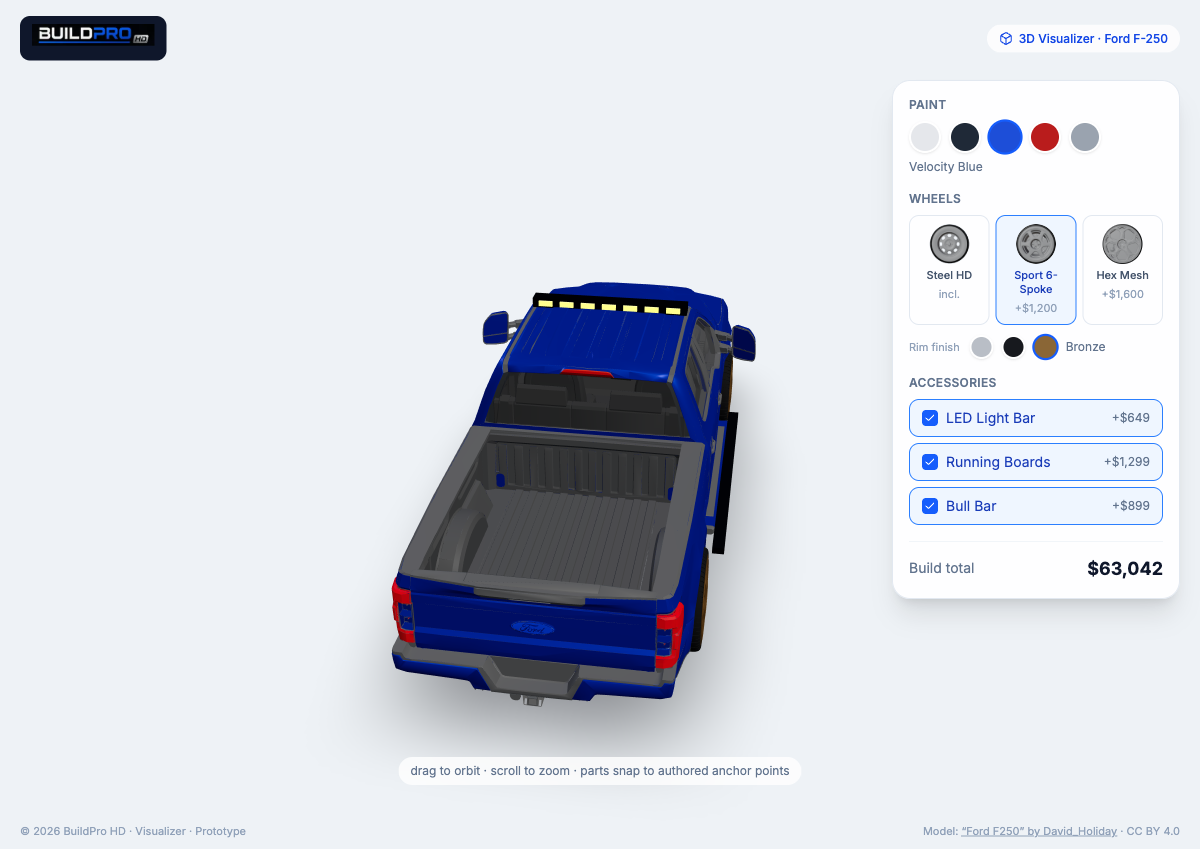
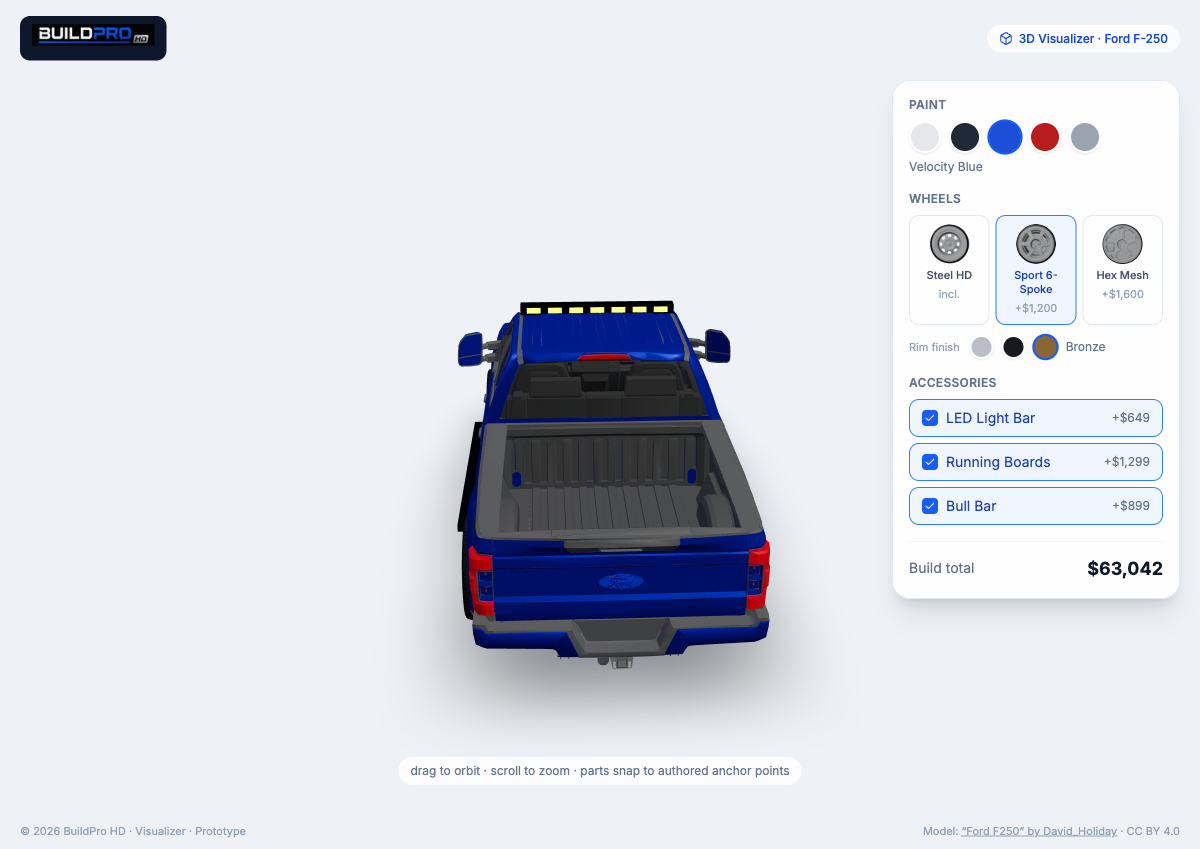
A blue Ford F-250 configured in the browser with a roof light bar, running boards, bronze sport wheels, and a live build total of $63,042. Live · Ford F-250 · Velocity Blue · Sport 6-Spoke / Bronze · +3 accessories
24MB0.64MB
model, after optimization
~1–2s
first load, 60 fps
10
authored mount points
$0
CDN egress fees (R2)
01

What it is

A shopper or a dealer salesperson sees an accessorized truck in real time in a normal browser — orbit it, change the paint, swap the wheels, add a light bar, running boards, or a bull bar, and the build price updates instantly. Accessories are high-margin; seeing them on the actual truck lifts attach rate.

The prototype proves the hard parts are solved: real-time 3D from a sub-megabyte model, a repeatable pipeline that turns messy free models into clean web assets, a parts system where accessories snap to authored mount points, and live customization driven by material swaps rather than a separate model per option. What remains is scale and polish — not invention.

02

How it works

Two halves: an offline asset pipeline that turns a raw model into a web-ready, riggable .glb, and a runtime that loads it, renders it, and lets the user configure it.

Salvage messy models

Voxel-proximity clustering. Free models are "panel soup" — thousands of disconnected shards with a stray spare wheel that wrecks the bounding box. We bin vertices on a 3D grid, flood-fill, and keep the largest blob. One step fixed centering, framing, and removed the spare.

Right it, size it

Auto-orient by axis extents, a robust slab-width check to flip an upside-down body, then center and scale to real-world metres (6.2 m for a crew cab) so parts authored in metres line up.

Rig the mount points

Named empties — Anchor_Roof, Anchor_Step_L/R, Anchor_Wheel_* — are the contract between a vehicle and its parts. Any vehicle rigged to the same names accepts the same parts. This is the scaling moat.

Place parts with portals

At runtime, each part becomes a scene-graph child of its anchor via createPortal — it inherits the exact transform automatically, immune to timing, camera framing, and scale. Wheels are cloned to all four hubs.

Swap materials, not models

Paint and rim finish recolor a named material live; only wheel design loads a new file. Clones share materials, so one mutation recolors all four wheels at once.

Compress & deliver

Draco shrinks geometry 5–10× (24 MB→0.64 MB). Assets live in R2 with zero egress, served same-origin to sidestep WebGL CORS. The app just references them by key.

Two lessons worth keeping. A metallic material with no environment map renders near-black — drop metalness or add an HDRI. And heavy three.js apps can OOM a cloud build, so we build on a runner and deploy the --prebuilt artifact.

The stack

three.js + R3F renderingThe web's WebGL engine, expressed as React components so the 3D scene and the UI share one state model. drei supplies loaders, controls, framing, and soft shadows.
glTF + Draco model formatThe "JPEG of 3D" — web-native and runtime-ready. Draco compresses mesh geometry 5–10×.
Blender (headless) authoringEvery pipeline step — clean, orient, decimate, rig, compress — runs as a scriptable Python job. Reproducible and CI-able.
Cloudflare R2 storage + cdnS3-compatible object storage with zero egress fees — the margin lever when serving multi-MB models at scale.
Next.js + Vercel app + hostingReact app, edge hosting. Server components for the shell, a client-only WebGL canvas for the viewer.
Zustand stateOne tiny store the 3D scene and the config panel both read. Pick "Bronze rims" → the wheels recolor and the total recomputes.
03

What works today

A functional prototype, live and mobile-friendly, fully isolated from the main SaaS so it can't destabilize production.

1 hero vehicle · Ford F-250 5 paint colors, live 3 real wheel designs 3 rim finishes 3 bolt-on accessories live build total orbit · zoom · soft shadows ~0.6MB model · 60 fps licensing tracked per asset
04

From prototype to product

The demo uses free kitbash assets and parametric rigging. To be a polished commercial product, close these — each is a known quantity, not research.

Content & fidelity

Real models, real fit

  • Licensed, textured PBR vehicles & parts + an HDRI environment (also fixes "black metal")
  • Exact-fit, hub-snapped rigging per vehicle; a rig spec every model conforms to
  • A repeatable content operation: procure → normalize → QA at volume
Product surface

Store, not toy

  • Real catalog: SKUs, prices, availability, and fitment rules (what fits what)
  • A small CMS/admin so non-engineers add vehicles & parts via a manifest
  • Save / name / share a build, hand to a dealer, request a quote
Reach

Everywhere the buyer is

  • AR — "see it in your driveway" via WebXR / Quick Look (assets are already glTF)
  • Performance at scale: LOD, GPU instancing, KTX2 textures, meshopt
  • Analytics on which builds shoppers assemble — gold for dealers & brands
05

To market

Who buys it

Three wedges

  • Dealerships — upsell accessories at and after the point of sale
  • Accessory brands — a branded configurator + AR as a commerce channel
  • Marketplaces / OEM — white-label build-and-price
How it ships

Embed or SaaS

  • An embeddable widget for a dealer site or product page
  • Multi-tenant SaaS — per-tenant catalog, pricing, branding (the main prototype already models tenants & roles)
  • Commerce hooks: add-build-to-cart, or request-a-quote into the CRM
The economics

Software margin, content cost

  • SaaS subscription per dealer/location, tiered by catalog & AR
  • Onboarding fee for building a catalog; optional brand rev-share
  • 3D content is the cost driver — the pipeline & cross-tenant reuse are the answer
Why it defends. Web-first, no install, mobile + AR. The anchor-based parts system makes adding a wheel or bar a content task, not an engineering one — and R2's zero-egress delivery keeps gross margin healthy as usage grows.
06

Roadmap

Phase 0 · Shipped

Prototype

R3F viewer, Blender pipeline, R2 delivery, anchors, paint / wheel / finish / accessory swaps, live pricing.

Phase 2

Multi-tenant SaaS

Catalog CMS/admin, embeddable widget, commerce & lead hooks, per-tenant branding, analytics.

Phase 3

Scale

Content-ops at volume, LOD / instancing / KTX2 performance, AI-assisted model generation, marketplace & OEM integrations.

07

References & standards

The specifications, guides, and industry standards this work builds on — and a starting library for anyone taking it further. Open-standard formats (glTF is an ISO/IEC standard) and the Khronos 3D Commerce program are what make cross-platform, cross-vendor 3D commerce viable.

Standards & formats
3D commerce (industry)
Rendering & PBR
Framework & runtime
Optimization & compression
AR & immersive
Delivery & hosting
Learn & glossaries
See it move

The demo is live.
Go build a truck.

Everything above runs today at production quality in your browser. Orbit it, paint it, wheel it, load it up.

Open the configurator →
The configurator UI panel — paint swatches, three wheel designs with thumbnails, rim-finish swatches, accessory toggles, and a live build total.